|
|
|
Main > Business & Finance >
Personal info managers
>
NotesHolder |
|
 NotesHolder lets you quickly type in any piece of information so that you can easily find it when you need, read it or print it out for your convenience. This is the most effective way to store all your notes without cluttering up your desk with PostIt and sticky notes. Unlike the other similar applications, NotesHolder is very thrifty with your screen space. You can even turn off NotesHolder icon in the system tray. But if you move your mouse cursor to the edge of the screen, the list of the notes sorted by the time of creation and divided into categories will pop up. Click once to create a new note or to edit an existing one. Click once more to print the note. NotesHolder Key Features: 1. Move the mouse to the edge of the screen to see your notes. No clicks need! 2. Only one click to create a new note or to edit an existing note! 3. Category feature is supported; 4. One-click printing; 5. Displays current date and time; 6. Configurable font size; 7. Different color schemes; 8. Multilanguage interface 9. And more... NotesHolder lets you quickly type in any piece of information so that you can easily find it when you need, read it or print it out for your convenience. This is the most effective way to store all your notes without cluttering up your desk with PostIt and sticky notes. Unlike the other similar applications, NotesHolder is very thrifty with your screen space. You can even turn off NotesHolder icon in the system tray. But if you move your mouse cursor to the edge of the screen, the list of the notes sorted by the time of creation and divided into categories will pop up. Click once to create a new note or to edit an existing one. Click once more to print the note. NotesHolder Key Features: 1. Move the mouse to the edge of the screen to see your notes. No clicks need! 2. Only one click to create a new note or to edit an existing note! 3. Category feature is supported; 4. One-click printing; 5. Displays current date and time; 6. Configurable font size; 7. Different color schemes; 8. Multilanguage interface 9. And more... |
|
Buy Now |
|
Key features
of NotesHolder:
-
Originality. NotesHolder is
an innovative project of our company and it was fully developed
by our team. In no way it is another clone of applications
storing you sticky notes on the Desktop of your computer. If you
have tried such applications already and given them up, you
should try NotesHolder. You'll certainly like it!
-
Usability. The easy-to-use
interface of the program allows performing all the main actions
as easily as possible. To see the list of your notes, just move
the cursor to one side of the screen or click the icon in the
system tray. To add a new note, simply click the message "Click
to add a new note" and to delete one, just drag it to the icon
of the shredder with your mouse.
-
Categories. To make the
process of searching through the notes easier you can group them
under various categories. To choose one of the categories you
should just click the tab with its name on it.
-
Checklist. You can mark any
note. It can be useful, for example, at NotesHolder use as a
todo list.
-
Reminders. You can create
reminders that trigger at the specified time or intervals. The
reminder can start the specified application or play a sound
file at the moment of triggering. If at that time you are very
busy with something else you can delay the reminder for a couple
of minutes.
-
Multilingual interface. At
present NotesHolder has a 48-language interface: English,
German, Italian, French, Japan, Chinese and many others. You can
choose your native language easily at the first run of the
program.
-
Multiple award winner.
NotesHolder won more than 10 awards from a number of competent
resources. Some of them you can see on your right.
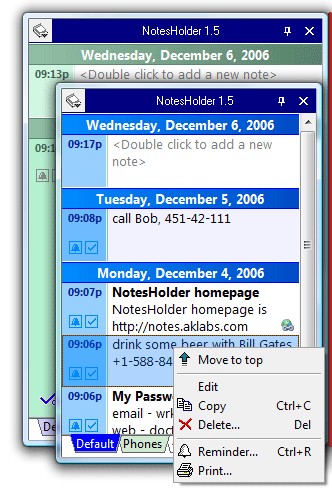
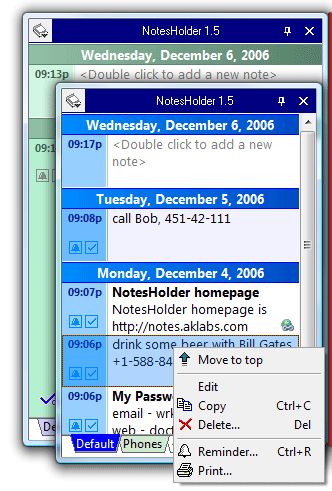
NotesHolder screenshot:
 |
|
|
Product
Information
|
-
Version:
1.6
-
Price:
$14.95
-
Size:
1.23MB
-
License:
Shareware
-
Developer:
A!K Research Labs
-
OS:
Win95, 98, ME, XP, NT 4.x, 2000, 2003
-
Rating:

|
|
|
|