|
|
|
Main > Business & Finance >
Presentation tools
>
PowerPointPipe |
|
 Search and Replace multiple Microsoft PowerPoint presentations. Change hyperlinks and UNC paths when servers get renamed; update contact details such as names, addresses and phone numbers; translate presentations with find/replace lists; update Microsoft SharePoint documents or Microsoft Namespace Server mappings. Using PowerPointPipe is simple. 1) Drag and drop files from Windows Explorer to PowerPointPipe, or right-click the files or folders to process in Windows Explorer and choose PowerPointPipe. 2) Add one or more search/replace pairs. 3) Go! PowerPointPipe can change thousands or millions of presentations, and can make multiple changes simultaneously to save time. It automatically handles read-only files, passwords and other protection, and it can be automated to run overnight or over a weekend. No user interaction is required. It even includes restart recovery in case Microsoft PowerPoint crashes! PowerPointPipe offers many more search and replace options than Microsoft PowerPoint; such as hyperlinks, text boxes, shapes, document properties (such as Title, Subject, Author, Company etc) and more. EasyPatterns and Perl regex patterns can also be used. Unlike competing products, PowerPointPipe is fully Unicode compliant (allowing Find and Replace with international character sets), and can handle an unlimited number of presentations and find/replace pairs. PowerPointPipe can also update ISO-9001 version numbers. PowerPointPipe can search/replace both .PPT and .PPTX PowerPoint document formats. Try it today - and see why Microsoft recommends PowerPointPipe to its customers! Search and Replace multiple Microsoft PowerPoint presentations. Change hyperlinks and UNC paths when servers get renamed; update contact details such as names, addresses and phone numbers; translate presentations with find/replace lists; update Microsoft SharePoint documents or Microsoft Namespace Server mappings. Using PowerPointPipe is simple. 1) Drag and drop files from Windows Explorer to PowerPointPipe, or right-click the files or folders to process in Windows Explorer and choose PowerPointPipe. 2) Add one or more search/replace pairs. 3) Go! PowerPointPipe can change thousands or millions of presentations, and can make multiple changes simultaneously to save time. It automatically handles read-only files, passwords and other protection, and it can be automated to run overnight or over a weekend. No user interaction is required. It even includes restart recovery in case Microsoft PowerPoint crashes! PowerPointPipe offers many more search and replace options than Microsoft PowerPoint; such as hyperlinks, text boxes, shapes, document properties (such as Title, Subject, Author, Company etc) and more. EasyPatterns and Perl regex patterns can also be used. Unlike competing products, PowerPointPipe is fully Unicode compliant (allowing Find and Replace with international character sets), and can handle an unlimited number of presentations and find/replace pairs. PowerPointPipe can also update ISO-9001 version numbers. PowerPointPipe can search/replace both .PPT and .PPTX PowerPoint document formats. Try it today - and see why Microsoft recommends PowerPointPipe to its customers! |
|
Buy Now |
|
Key features
of PowerPointPipe:
- New! Find and replace inside the Slide
Master (per Slide), Master Slide (per presentation), Notes
Master, Title Master and Handout Master
- New! Search and replace inside OLE
Link paths e.g. to embedded Excel worksheets
- Search and replace inside slide notes
- Search and replace with all
PowerPoint's options such as Match Case, Match Whole Word etc,
plus more
- Handles any number of sub folders
- Search and replace inside hyperlink
addresses
- Search and replace inside shapes and
text boxes
- Search and replace inside built in
document properties and custom properties such as
Title, Subject, Author, Company etc
- Search and replace inside headers
and footers
- Fully Unicode compliant - search and
replace international character sets (unlike competing
products)
- Allows replacements to be longer than
255 characters (Microsoft PowerPoint limits this to 255)
- Works with Windows SharePoint Services
document libraries
- Control the presentation types used -
so you can process any custom presentation type
- Can be automated or scheduled via the
command line, and settings are saved in an easy-to-edit or
generate XML format
- Read only documents can be processed or
skipped
- Easy to install/uninstall
- The original file date and time stamp
can be preserved.
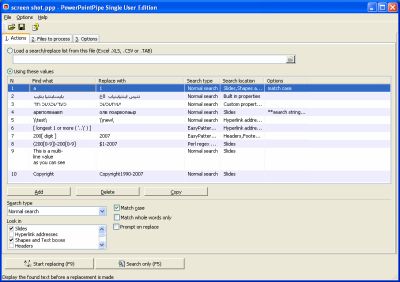
PowerPointPipe screenshot:
 |
|
|
Product
Information
|
-
Version:
2.8
-
Price:
$499.00
-
Size:
0.80MB
-
License:
Shareware
-
Developer:
DataMystic
-
OS:
Win95, 98, ME, NT
3.x, NT 4.x, 2000, XP, 2003, Vista
-
Rating:

|
|
|
|
