|
|
|
Main
> Business
& Finance > Project Management
> Time Logger |
 Time
Logger 1.2 is designed to make the job of filling in your time sheets a
no-brainer. It records the time you spend on your activities and then
presents you with a summary timesheet for the current week or any week since
you started using Time Logger 1.2. From the moment you login until the
moment you logout, Time Logger 1.2 runs hidden in the background without
obstructing your other apps, counting time for your current task. Switching
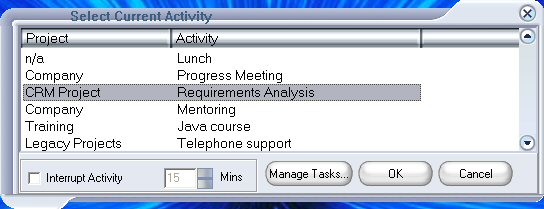
tasks couldnt be more simple or quicker. Pop-up a list of your activities at
any time with a single Alt key combination, then select the new activity
with a single mouse click. Time Logger is designed to be used in parallel
with your formal time sheet system if you have one. Export your weekly
timesheet data via the clipboard to any office app or your employers
timesheet system. Time
Logger 1.2 is designed to make the job of filling in your time sheets a
no-brainer. It records the time you spend on your activities and then
presents you with a summary timesheet for the current week or any week since
you started using Time Logger 1.2. From the moment you login until the
moment you logout, Time Logger 1.2 runs hidden in the background without
obstructing your other apps, counting time for your current task. Switching
tasks couldnt be more simple or quicker. Pop-up a list of your activities at
any time with a single Alt key combination, then select the new activity
with a single mouse click. Time Logger is designed to be used in parallel
with your formal time sheet system if you have one. Export your weekly
timesheet data via the clipboard to any office app or your employers
timesheet system.
We all make mistakes so Time Logger 1.2 includes log-edit and back-track
features to allow you to make any adjustments to the recorded activities you
like. Forget those Monday morning blues trying to remember what you were
working on last week. Use Time Logger 1.2 and show your boss exactly what
you really spend your time on.
Who is it for?
Time Logger 1.2 is useful for anyone who needs to keep an accurate record of
their activities.
Typical users are professionals in project or multiple client environments.
Time Logger 1.2 installation does not require administrator privileges so
anyone can use it.
How long does it take to configure?
After installing, spend 5 minutes upfront to define activities specific to
you. After that it only takes a few seconds switching tasks whenever you
change activity.
How do I use it?
Simply login as usual when you start work each day and logout at the end of
the day. In between, pop-up the task switch window, by default with Alt-1,
whenever you move onto a new activity or client. Browse your timesheet at
any time and optionally export the data to any MS Office app or your formal
timesheet recording system. |
|
Buy
Now |
Key
features of Time Logger:
-
Unlimited number
of projects
-
Each project
timer can run independently of others
-
Timers may be
paused
-
Fees are
calculated from project's hourly rate
-
Numerous reports
available
-
Includes desktop
component
-
Export time data
via e-mail (OTA) or the desktop component
System
Requirements:
Time
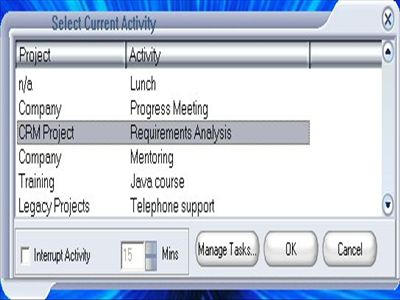
Logger screenshot:
|
|
|