|
|
|
Main > Business & Finance >
Spread sheets
>
EldoS AutoSaveXL |
|
 If you ever experienced MS Excel crash, you know that data recovery is a time-consuming and hard to do thing. Timely saving of the document that you are working on is very important. Unfortunately Excel's built-in autosave feature is very limited and mostly useless. EldoS AutoSaveXL was designed to replace built-in module and provide extra features such as saving the document without asking extra questions, keeping a specified number of revisions for each document, easy recovery of any document revision. Currently EldoS AutoSaveXL offers the following features: 1 - Possibility to specify how many backup copies of the file are kept; 2 - An option to save the file over it's current version (backup previous version of course) or to create a copy of the file marked with time of save operation; 3 - A handy dialog to restore the necessary version of the file; 4 - Separate configuration for every file or default settings. With AutoSaveXL recovering an old edition of the file will not be a nightmare anymore. And, the last but not the least, you will be able to review and compare different revisions of the file at the same time by easily opening then in two windows of MS Excel. If you ever experienced MS Excel crash, you know that data recovery is a time-consuming and hard to do thing. Timely saving of the document that you are working on is very important. Unfortunately Excel's built-in autosave feature is very limited and mostly useless. EldoS AutoSaveXL was designed to replace built-in module and provide extra features such as saving the document without asking extra questions, keeping a specified number of revisions for each document, easy recovery of any document revision. Currently EldoS AutoSaveXL offers the following features: 1 - Possibility to specify how many backup copies of the file are kept; 2 - An option to save the file over it's current version (backup previous version of course) or to create a copy of the file marked with time of save operation; 3 - A handy dialog to restore the necessary version of the file; 4 - Separate configuration for every file or default settings. With AutoSaveXL recovering an old edition of the file will not be a nightmare anymore. And, the last but not the least, you will be able to review and compare different revisions of the file at the same time by easily opening then in two windows of MS Excel. |
|
Buy Now |
|
Key features
of EldoS AutoSaveXL:
-
make your data safe if Microsoft
Excel crashes;
-
secure your data against operator
error or virus evil action;
-
keep track of Microsoft Excel
spreadsheet changes;
-
backup Microsoft Excel files
automatically.
System Requirements:
- MS Excel 2003, MS Excel
XP(2002), MS Excel 2000.
- Windows 98/ME, Windows 2000 or
Windows XP
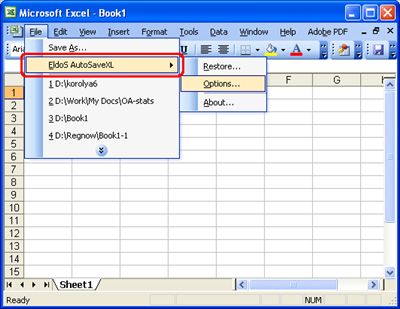
EldoS AutoSaveXL screenshot:
 |
|
|
Product
Information
|
-
Version:
2.0
-
Price:
$14.95
-
Size:
0.62MB
-
License:
Shareware
-
Developer:
Afalina Co., Ltd.
-
OS:
Win95, 98, ME, XP, NT 4.x, 2000
-
Rating:

|
|
|
|
