|
|
|
Main > Business & Finance >
Word processing
>
PDF Stamp |
|
 PDF Stamp (PDF Watermark) is an advanced product that enables you to stamp content into a PDF document. Besides images, texts and graphics, PDF Stamp is able to add links and notes. These processes can be realized in a determined number of pages with precise control over the size and position, the stamped text and/or images become a permanent part of each PDF document. There is no limit to the amount of stamps you could apply to a single document and no limit to the amount of documents you can stamp, As special feature you can integrate PDF Stamp into yourself programs (Include client side and Server side applications). PDF Stamp (PDF Watermark) lets you stamp watermarks such as "Confidential" on pages that include sensitive information or "Draft" on a preliminary PDF document to be distributed for review. You can stamp PDF document names, revision numbers, Date/Time stamps, pages numbers, contact information or any text that you need added to the file. With the JPEG image support you can stamp company logos, author signatures, products, charts or any artwork in JPEG format. A Scale feature is provided with image stamping to easily increase or decrease the size of the stamped image, leaving the original image size intact. PDF Stamp(PDF Watermark) Features 1. PDF Stamp(PDF Watermark) is easy to use; 2. PDF Stamp(PDF Watermark) does NOT need Adobe Acrobat software; 3. PDF Stamp(PDF Watermark) supports PDF1.5 protocol (formerly only supported by Acrobat 6.0); 4. PDF Stamp(PDF Watermark) supports windows 98, ME, NT, 2000 and XP OS; 5. PDF Stamp(PDF Watermark) supports stamp to the page header and page footer; 6. PDF Stamp(PDF Watermark) supports image stamp (JPEG/TIFF/PNG images); 7. PDF Stamp(PDF Watermark) supports text stamp; 8. PDF Stamp(PDF Watermark) supports graphics stamp (Line and Rectangle) (In the future version); 9. And more... PDF Stamp (PDF Watermark) is an advanced product that enables you to stamp content into a PDF document. Besides images, texts and graphics, PDF Stamp is able to add links and notes. These processes can be realized in a determined number of pages with precise control over the size and position, the stamped text and/or images become a permanent part of each PDF document. There is no limit to the amount of stamps you could apply to a single document and no limit to the amount of documents you can stamp, As special feature you can integrate PDF Stamp into yourself programs (Include client side and Server side applications). PDF Stamp (PDF Watermark) lets you stamp watermarks such as "Confidential" on pages that include sensitive information or "Draft" on a preliminary PDF document to be distributed for review. You can stamp PDF document names, revision numbers, Date/Time stamps, pages numbers, contact information or any text that you need added to the file. With the JPEG image support you can stamp company logos, author signatures, products, charts or any artwork in JPEG format. A Scale feature is provided with image stamping to easily increase or decrease the size of the stamped image, leaving the original image size intact. PDF Stamp(PDF Watermark) Features 1. PDF Stamp(PDF Watermark) is easy to use; 2. PDF Stamp(PDF Watermark) does NOT need Adobe Acrobat software; 3. PDF Stamp(PDF Watermark) supports PDF1.5 protocol (formerly only supported by Acrobat 6.0); 4. PDF Stamp(PDF Watermark) supports windows 98, ME, NT, 2000 and XP OS; 5. PDF Stamp(PDF Watermark) supports stamp to the page header and page footer; 6. PDF Stamp(PDF Watermark) supports image stamp (JPEG/TIFF/PNG images); 7. PDF Stamp(PDF Watermark) supports text stamp; 8. PDF Stamp(PDF Watermark) supports graphics stamp (Line and Rectangle) (In the future version); 9. And more... |
|
Buy Now |
|
Key features
of PDF Stamp:
-
Do NOT need Adobe Acrobat software
-
Support up to PDF1.7 document format
(formerly only supported by Acrobat 8.0)
-
Support Windows 98, ME, NT, 2000,
XP, 2003, Vista and both 32 and 64 bit systems
-
Support stamp to the page header and
page footer
-
Support image stamps with various
image formats (eg. JPEG, GIF, TIF, TIFF, PCX, PNG, TGA, ICO,
BMP, JP2, PNM image formats)
-
Support text stamps with various
effects
-
Support graphics stamps (Line and
Rectangle)
-
Output file (-o) — Duplicates the
original file with the file name you specify. Stamps are placed
in the duplicate file, leaving the original copy unchanged
-
Stamp pages using the standard Base
14 Fonts and Windows System Fonts
-
Support Font Style, Font Size, Text
Modes (solid, outline), Grayscale and RGB Color (0-255 RGB color
values supported)
Top, bottom, vertical center, diagonal-top left and
diagonal-bottom left
-
Stamp can be placed in the exact
vertical center of a page (or the exact vertical center within a
individual stamping space)
-
Enabling you to easily position the
stamp in any location on the page
-
Stamp on Top of or Underneath the
original PDF document page contents
-
Text can be stamped on Any Angle.
Any positive or negative numbers, including decimal numbers may
be used to specify an angle in degrees
-
Specify start and ending page
numbers (page range)
-
As an alternative to specifying
static values for the text, you can use stamping variables to
stamp dynamic data. Dates, times, page numbers, file names are
just a few of the variables available. See the PDF Stamp
documentation for a listing of all Stamping Variables.
-
Support multiple line text stamps
within one stamp item
-
JPEG, GIF, TIF, TIFF, PCX, PNG, TGA,
ICO, BMP, JP2, PNM etc. image size can be increased or
decreased. No need to adjust the image size in another
application before the stamp
-
Wrap text to a new line if it would
otherwise be too long to fit in its margined area
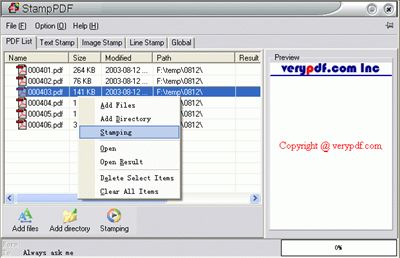
PDF Stamp screenshot:
 |
|
|
Product
Information
|
-
Version:
2.0
-
Price:
$38
-
Size:
1.088MB
-
License:
Shareware
-
Developer:
verypdf.com Inc
-
OS:
Win95, 98, ME, NT 3.x, NT 4.x, XP, 2000
-
Rating:

|
|
|
|
