|
|
|
Main
>
Home & Education >
Calendars &
Planners > Alarm++
(single computer license) |
|
Alarm++ fulfills your reminder and
scheduling needs. Create multiple alarms to: remind you of events, meetings, birthdays, deadlines, TV shows visit web pages.
Each alarm can repeat at many different intervals, such as every
few minutes, hours, days, months, or years. They can repeat any
number of times, from once to forever or until a specific date.
Alarms can also be restricted to specific weekdays, weeks, months,
weeks of the month, and time ranges. Events can be ignored if they occur a
specific number of minutes, hours, or days in the past. You can
create templates for creating new alarms. This greatly simplifies
entering values for the types of alarms that you create often.
Alarm++ has a well-designed and easy-to-use interface. It stays
unobtrusively in your system tray or can be minimized on your
taskbar. The auto save feature means that you never have to worry
about losing your alarms to a Windows system crash.
Alarm++ is powerful, flexible, easy to
use, and simple to install (and to uninstall if you decide to). |
|
Buy
Now |
Key
features of Alarm++ (single computer license):
- Many repeat options: minutes,
hours, days, weekdays, weeks of the month, months, workdays,
non-workdays, etc
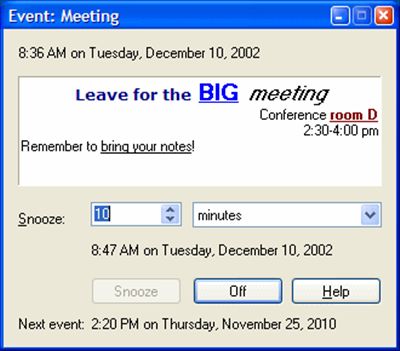
- Snooze command which you can
adjust when an alarm goes off (in a few minutes, hours, or
days)
- Restrict events to specific
weekdays, months, weeks of the month, and/or time range
- Skip events that don't occur
on workdays or let them occur on the next available workday
- Ignore events if they occur in
the past
- Play sound files, a speaker
beep, or no sound at all
- Saves changes
automatically—you'll never lose your alarms to a Windows crash
- Event windows appear on your
screen, wherever you choose, but don't take your cursor away
from your work
- Send messages to other
computers on your network
- Run applications, scripts, and
batch files
- Visit Web pages (Internet
shortcuts) automatically
- Send e-mail automatically,
even when you’re away from the computer
- Create alarms from templates
that you create yourself for the alarms you use most often
- Well-designed user interface
-- you may never need to reference the context-sensitive help
help
- Stays out of the way on your
system tray and only displays its main window when you open it
- Context menus and docking
toolbars let you customize the application to fit the way you
work
Alarm++ (single computer license) screenshot:
|
|
|
Product
Information
|
-
Version: 7.10
-
Price:
$25
-
Size:
1.55
MB
-
License:
Shareware
-
Developer:
12noon
-
OS:
Windows 95, 98, ME, NT, 2000, XP, Vista, 2003
-
Rating:

|
|
|
|